14 Mar
2013

Kindle Paperwhite Review + Vlog

In the vlog, I compare the Kindle Keyboard and Kindle Touch to the Kindle Paperwhite.

Here are some more detailed thoughts on what I like and don’t like about the Kindle Paperwhite.

Light – When I first got the Paperwhite, I felt like the light kind of glared at me.  I was squinting while reading and my eyes were getting tired easily.  I realized after a few days it was because I was holding it inches from my face.  I’m so used to having a dim light on my Kindle Keyboard from my stupid clip-on light that I didn’t realize I was doing that.  I’ve gotten more comfortable reading at night by holding it further away and increasing the font a little if I need to.

That being said, I’m not the biggest fan of the way the screen is lit.  I don’t like the “blue” tint to it.  It’s like those car headlights that are blue instead of yellow.  They aren’t brighter than other headlights, but they are really annoying to the eyes for some reason.  And even if they say on Amazon that it’s “front-lit,” it still feels like a back-lit screen that isn’t much different from the 10 other screens I look at every day.  I love the e-ink technology, and the built-in light makes it not look like e-ink.  However, when I turn the light completely off, it looks just like my other Kindle screens.

I do love that you can change the light brightness.  The Kindle says to use the highest light setting in bright light, but I actually turn the light off during the day and use a low setting at night.  I think the light turned off during the day makes it look more like a book.

Navigation – I like the navigation much better than the Kindle Touch. Now, all the menus and options are at the top.  I usually hate touch screens, but I like the one on the Paperwhite.  It’s not as sensitive as the Kindle Touch and it actually does what I want it to.  The only thing that bugs me about the navigation is that turning the Wi-Fi off is no longer easy – it’s buried in a bunch of navigation and a little hard to find.  I tend to leave it on all the time now, which I didn’t do on my other Kindles, but the battery life doesn’t seem to be as affected as much as it would have been on say my Kindle Keyboard.  The covers on the home page instead of a long list is very nice to look at and easier to use.

Navigation Tip – I read the whole user’s guide and here’s the only tip I learned: Press the 1/15 number on the bottom of the homescreen to go to a specific page.   That way if you want to go to the last page of books on your Kindle, you don’t have to swipe 15 times.

Ads – The first thing I did when I set up my Paperwhite was to turn off the recommendations *cough* ads *cough* that were taking up half the homescreen. (In case you want to know how – Menu>Settings>Device Options>Personalize Your Kindle>Recommended Content>Off.) At first I got the ad version that is $20 cheaper.  I was highly annoyed by it after one day and ended up returning it.  With the cool cover waking feature, I found it completely stupid that you still had to slide your finger across the screen to remove the wallpaper ad.  Uh, what is the point of the cover wake feature if I can’t go straight back to my book?   If you aren’t going to get the cover, then the ad version is probably fine (if you won’t get annoyed that you have to push power and then swipe the screen just to get to your book.)  My favorite thing by far about the Paperwhite is the cover.  I adore being able to just close my Kindle cover at night and not have to remember when I’m half asleep to push the power button.  Same thing with just opening the cover and going right back to where I was in my book.

Cover –  The Paperwhite is light and compact even with the cover.  It’s not easy to get it into the cover, so once it goes in, I’m not going to bother taking it out unless I really need to.  The leather is textured, pretty and feels nice to hold.  The cover makes it so I can just toss it in my purse and take it everywhere with me without worrying it will get scratched.

New Features I Like - There are some new features I like and some that I don’t.  I like that you can now choose the publisher’s font if you want (and if the book makes it available).  I also like that it tells you how fast you read.  This information is stored on the individual Kindle and not on a server of any kind (when I repurchased the non-ad Kindle Paperwhite, it had to start over figuring out my reading speed). Gosh I read slow.  I find myself checking how long I have until the end of a chapter before closing my Kindle where before I used to just stop anywhere.  I think it will help me read a little more and a little faster.

New Features I Don’t Like – I wish there was a home button.  It took some getting used to that there are no buttons on this thing. I don’t like shopping in the store on the Kindle.  It doesn’t show prices on any navigation page – you have to select the book first.  Because of that, I almost always buy ebooks from my laptop.  I prefer buttons to turn the pages rather than tapping the screen. I find myself accidentally going a page forward or back sometimes (especially if I fall asleep while reading and leave my thumb on the screen by accident…yeah, I’ve done that a few times).  That being said, the touch screen is a lot easier to use for everything else like highlighting, word prediction when typing notes, and using the dictionary.  Maybe the next Kindle will have some way to combine the button page turns and the touch screens….I’m probably the only person that would want that, but hey I can dream. :)

Overall, the built-in light is not my favorite but I’ve gotten used to it, the navigation is easy to use, and the cover wake feature is my favorite thing about the new Kindle. I definitely think it’s worth getting.

New Kindle with Awesome Features and Lame Name
6 Sep
2012

New Kindle with Awesome Features and Lame Name

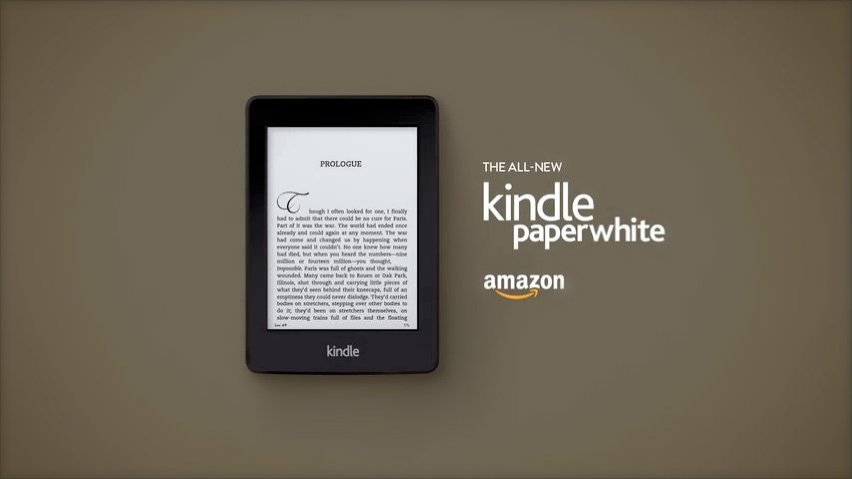
Kindle is coming out with a new line on October 1 which you can pre-order now.  It looks pretty cool and not even my abnormal devotion to buttons on my Kindle Keyboard can keep me from wanting one.  I’ll point out some of the features I think will be handy, but first can I say how dumb the new name is? It’s called “Paperwhite.”  The Nook’s version of this is called “GlowLight” and made me want one when I didn’t even know what the crap it was.  So I’m going to think up a better name for the new Kindle in 5 seconds…I would have called it “Illumination.”  But that’s just me.  And sadly no one asked me.

Here’s a list for your scrolling pleasure of the new features I really like:

  • The built-in light (YES!!!!!!!)
  • The price is $20 cheaper than the Nook, but it comes with ads.  I wonder, does the ad-free Kindle have better screen-savers than the “Dead-Poet Society” on my Kindle Keyboard? Because that might be worth the extra $20 right there for the no-ad version.
  • Time to Read feature – it gives you a personalized estimate on when you will finish the chapter based on the data it collects on how fast you read.  I don’t know how to feel about this.  How much data is this thing collecting about me? And it takes me HOW LONG to read a stinkin chapter??
  • Auto Wake and Sleep – the new leather cover automatically wakes your Kindle when it’s open and puts it to sleep when you close it like the iPad covers do. I SO WANT THIS.  But it’s 40 bucks. Gahhh. Why can’t it be 20. Please?
I’m not going to run out and buy it, but it’s something to look forward to when Buttons (my Kindle Keyboard) dies.

There’s also a new version of the Kindle Fire. I care not.

What do you think of the new Kindle? Do you like the name or is it just me?

27 Sep
2011

Kindle Finally Gets Library Books

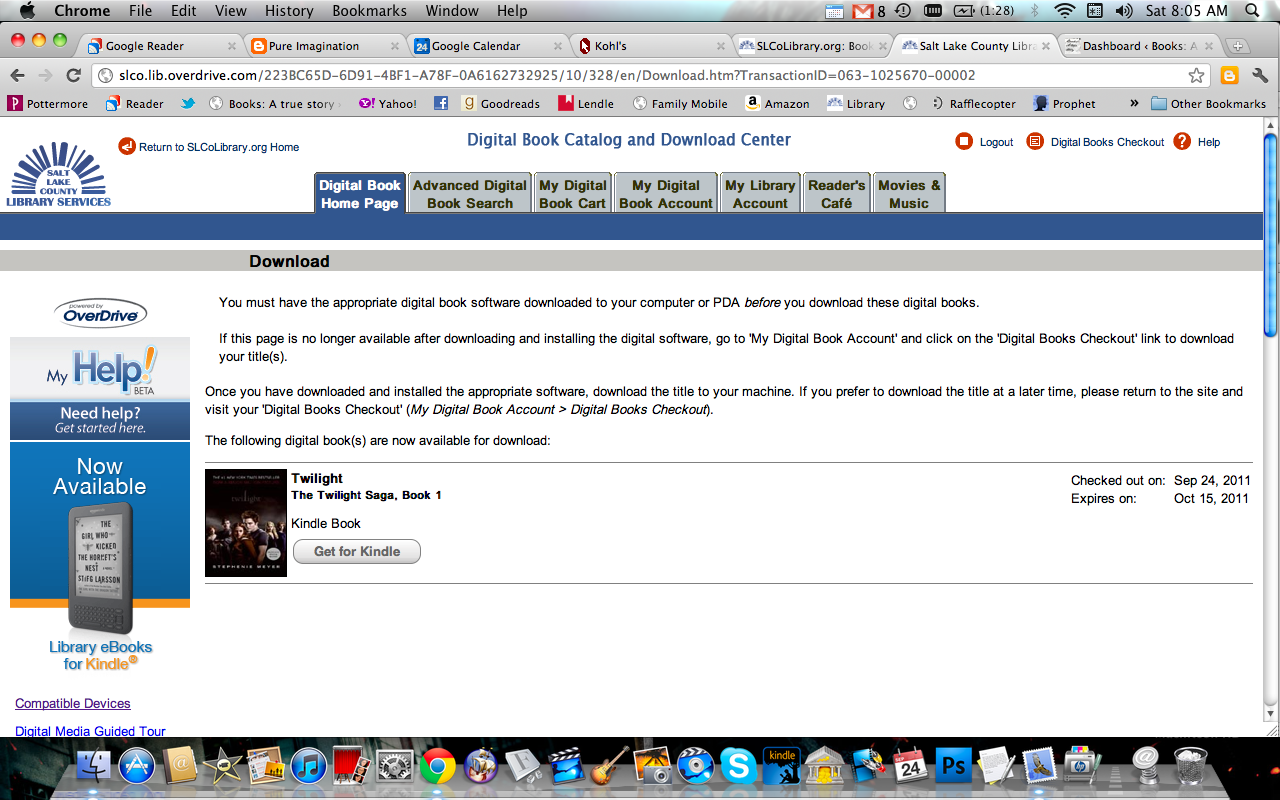
This is what it looks like on my library website when I check out a kindle book.

Yay!  I’ve been waiting for so long to get library books on my kindle.  Up until this point, this was one of those areas that the Nook had a clear advantage.  So, last Wednesday (the first day you could borrow library books for you kindle) I got onto my libraries’ website and went a little nuts.  At least half of my Amazon wish list was available at my local library.  My local library subscribes to OverDrive, which is the ebook borrowing service that supports kindle library books.  It was easy to check out a book and it delivers wirelessly to my kindle just like purchasing a book.  Some of the popular books have waiting lists because like real books, the library has a limited number of ebooks available.  One thing that I love about borrowing ebooks is that they are automatically returned.  That means no late fees and no waiting longer when some bozo lost the book you’ve been waiting weeks to read.

I thought that the kindle would allow the popular epub format of ebooks to work on it, but to my surprise there was a separate link under each book for the kindle version of that book.  This worries me.  The Harry Potter ebooks are going to be sold by Google Books this October and Google only sells epub format books.  Am I going to be able to read Harry Potter on my kindle?  I can’t say for sure until they start selling them, but if I can’t read Harry Potter on my kindle, my pure love will turn to blackest hate.

There were a few articles last week about publishers getting nervous over ebooks being available from libraries.  These nervous publishers are obviously making decisions based off of fear.  Let me give you an example.  I’m going to borrow Eragon from the library.  The movie version of this book was so bad that I would never in a million years pay to read it.  However, I am willing to give it a try if I don’t have to pay to read it.  This is true of all books.  People are more willing to try things that are free. This increases demand.  Libraries pay for books.  I don’t get what publishers are complaining about.  Another example; I borrowed the Twilight Saga on my kindle even though I own all of these books just because I’d rather read them on my kindle.  I personally think that libraries increase the demand for books.  Libraries buy more of the popular books and people that don’t like waiting for them go out and buy them.  I think this means more profit for publishers in general.

What do you think?  Do you think libraries are good or bad for the profit of publishing companies?

25 Jul
2011

I Only Read One Book at a Time…Kind of

I was sad to break my blogging streak, but I went on vacation this past weekend at Mirror Lake in Utah.  I had blogged for 35 days straight without missing a day.  It had to end sometime.

I probably won’t write much about the vacation because it’s hard for me to write about what’s happening in my life now.  It just doesn’t have the perspective of looking back and it tends to read like a bunch of facts instead of a story.  I will say, though, that I thought my kindle was broken.  I LOVE reading on vacations and I was very sad that my broken kindle didn’t allow me to do this on the last day of our trip.  Marla was the only one that gave me the properly shocked reaction I was looking for.  My two boys were running around the trailer and accidentally knocked it off the night stand.  It only fell two feet and when I turned it off, the screen went blank. I kept holding the power button to reset it, but nothing happened.  When I got home, I got online to troubleshoot it.  Turns out, you do hold the power button to reset it, you just have to do it longer than I was.  It reset fine.  Crisis averted.

Me and my son at Mirror Lake

“Books are more real when you read them outside.”

-Maggie Stiefvater, Shiver

Everyone was very nice about my kindle being broken on the trip and offered books for me to read.  When I said that I only read one book at a time, my husband laughed. “You do not!”  Okay, he’s kind of right.  Here are the books I’m reading right now:

  • The Doctrine and Covenants of the Church of Jesus Christ of Latter-Day Saints
  • Doctrine and Covenants Student Manual
  • The Twilight Saga Official Illustrated Guide
  • Grimm’s Fairy Tales
  • The Lost Hero by Rick Riordan

So I only read one novel at a time. Short stories and scriptures don’t count.  It’s one of my “rules” to not start another novel until I’ve finished the one I’m reading because I don’t read for the sake of reading.  I like to finish stories and it’s really hard for me to not finish a book once I’ve started it.  This makes me really selective of the books I read because it’s hard for me to put it down even if it’s trashy.  I’m getting better, though.  Even though it was nice of my dad to offer his Mitt Romney book for me to read, I didn’t see the point of reading 20 pages and then going back to the book I was reading.

Some people will ask how I can keep books straight if I’m reading more than one.  It kind of reminds me of how people will watch many TV shows on a weekly basis and not get them mixed up.  They’re different stories – it’s not hard.  I will say, though, that reading more than one novel at a time will give me very strange dreams sometimes.  Apparently my unconscious mind can’t keep the stories straight as well as my conscious mind can.

Double Review: War and Peace and My Kindle
21 Jun
2011

Double Review: War and Peace and My Kindle

War and Peace War and Peace by
Published On: 1865
Genres: , ,
Source:

Buy the Book Goodreads

The Short, Sweet, and Spoiler-Free Blurb:

Tolstoy’s epic masterpiece intertwines the lives of private and public individuals during the time of the Napoleonic wars and the French invasion of Russia. The fortunes of the Rostovs and the Bolkonskys, of Pierre, Natasha, and Andrei, are intimately connected with the national history that is played out in parallel with their lives. Balls and soirees alternate with councils of war and the machinations of statesmen and generals, scenes of violent battles with everyday human passions in a work whose extraordinary imaginative power has never been surpassed.

5 Stars

It was a little philosophical in places but not so much that it bogged down the story. The characters were amazing and the “point” he was trying to make was not at all what I was expecting. There’s humor, love, tragedy, and a unique look at a different time.  Tolstoy isn’t as hard to read as I thought he would be.  And there’s one reason why:

My new Kindle for Christmas with its pretty green cover.

Review of My Kindle

Here’s why I love reading really long, old books on my kindle.

  • I like to read in bed, and reading the 2-inch hardcover of War and Peace would probably have given me some sort of injury.
  • Tolstoy loves to name his characters with the exact same first name and difficult to pronounce last names. For example: Anna Pavlovna Scherer and Anna Mikhailovna Drubetskoy. Without the search function, it would have been impossible to tell the difference between these two characters.
  • Speaking of character names, he also likes to give each character at least 1 name, 2 last names, and 5 nicknames.  Take Nikolai for example.  His full name is Count Nikolai Ilyich Rostov.  But everyone calls him Nikolushka, Nikolenka, Nikolashka, Kolya, Nicolas, and/or Coco. I would like to express my thanks to the Search feature on my kindle for saving me from a big headache.
  • I read the Pevear/Volokhonsky translation and they left all of the original French in the text.  Without my linked footnotes that instantly go back and forth between the English and French, it would have been a lot of page turning.
  • Instantly looking up archaic words in the built-in dictionary is always handy and saves me from having to hold another large and heavy book (namely, my dictionary:).
  • Oh, and the best reason.  Most old books on the kindle are free.

So, if you want to read War and Peace, it’s worth it and I recommend you get one of these↓